Your symptom & mood tracker. In one tap.
Trace Health turns your daily tracking into a clear picture of your health, privately. How your symptoms and mood evolve, what sets them off or eases them, and a PDF for your doctor.
Free to track symptoms · No account · No servers · No ads
Tap to log. Swipe to catch up.
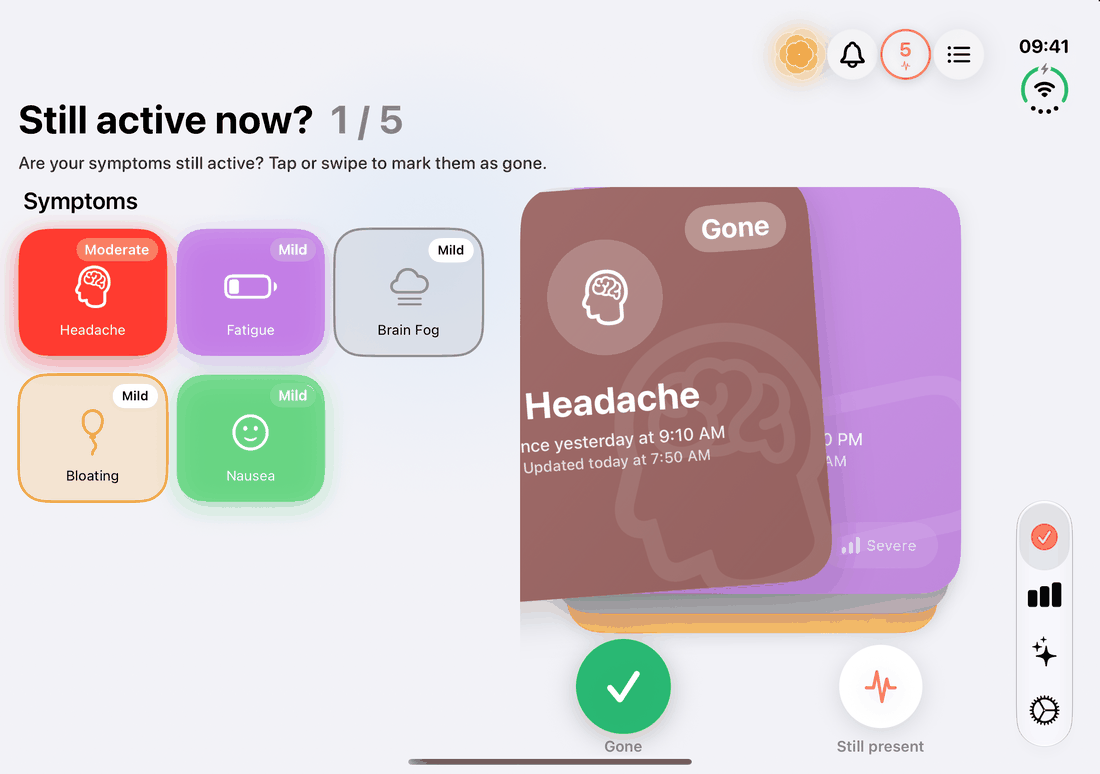
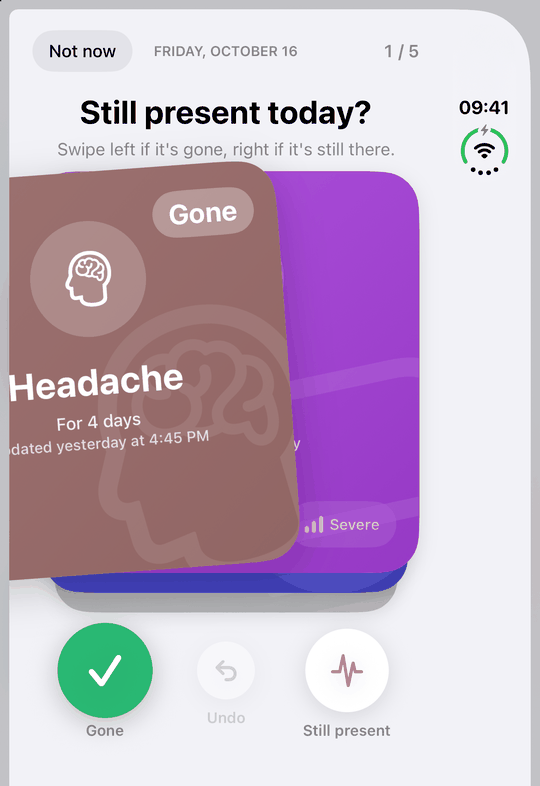
Tap to log. Swipe to catch up. Tap a symptom to log it, with the exact time. Tap again to update it: Mild, Moderate, Severe, or gone. And once a day, the Daily Symptom Review turns the update into a quick, fun swipe: the symptoms still going come up as cards, left if one is gone, right if it's still there. No forms, no typing, no setup.
Track your mood. See what lifts it.
Once a day, Trace Health asks how you felt overall. One tap, plus a private note if you like. After a few weeks it shows what tends to lift your mood and what weighs on it, from sleep, caffeine and alcohol to exercise and medication, and how your mood moves around your symptoms.
- Syncs both ways with State of Mind in Apple Health
Know what your cycle brings, before it comes.
Your period, your symptoms, your mood
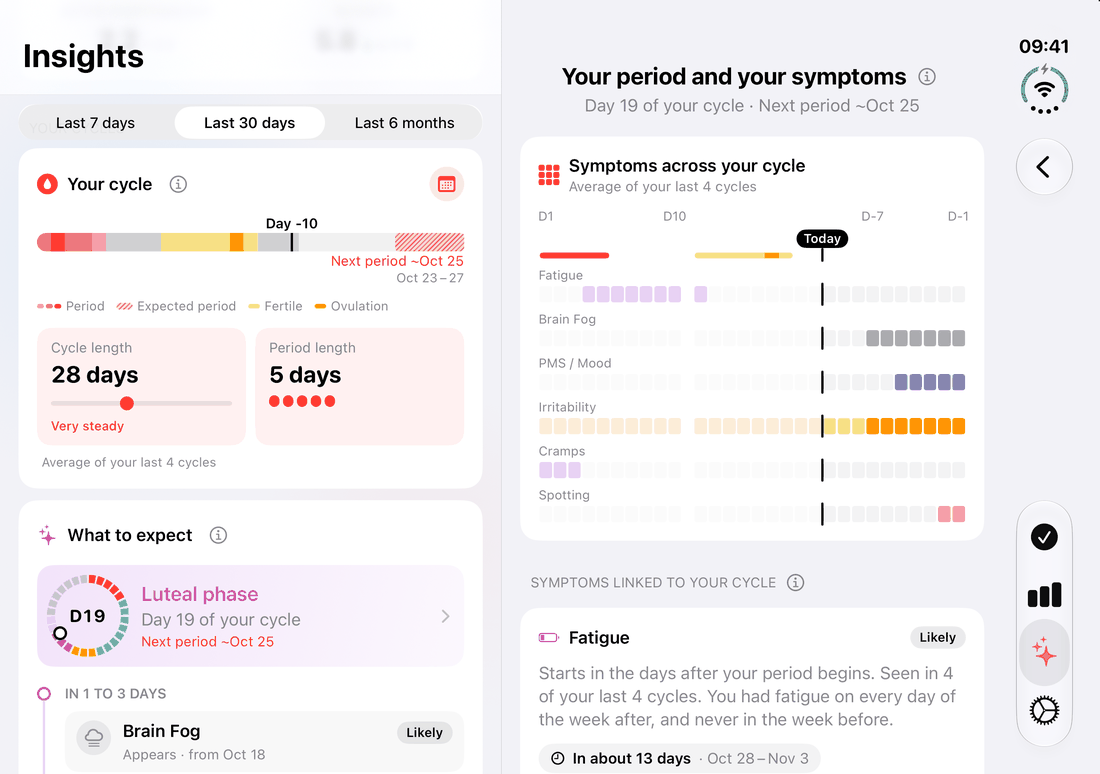
Log your period in one tap, like any symptom. Trace Health follows your cycle: the day you're on, your usual cycle and period length, and when your next period should come. After a few cycles it shows which symptoms get worse the week before your period, as it starts or around ovulation, and tells you what to expect in the days ahead.
- Cycle Calendar with your next periods and fertile window
- Brings in your periods from Apple Health or your period app
- Made for PMS, PMDD, endometriosis, PCOS and perimenopause
- On Apple Watch and in a Home Screen widget: your cycle day on a ring (Premium)
Log from your wrist.
Symptoms don't wait until your phone is in your hand. Raise your wrist and tap: on a walk, in a meeting, or in bed in the dark, when a bright screen is the last thing you want. Everything lands on your iPhone, in the same history, charts and reports.
On your watch face
All your symptoms
Your week at a glance
Your mood
Your cycle
Activities too
Syncs with your iPhone directly: no account, no server of ours. Needs watchOS 11 or later and Trace Health on your iPhone.
Optimized for iPhone Duo.
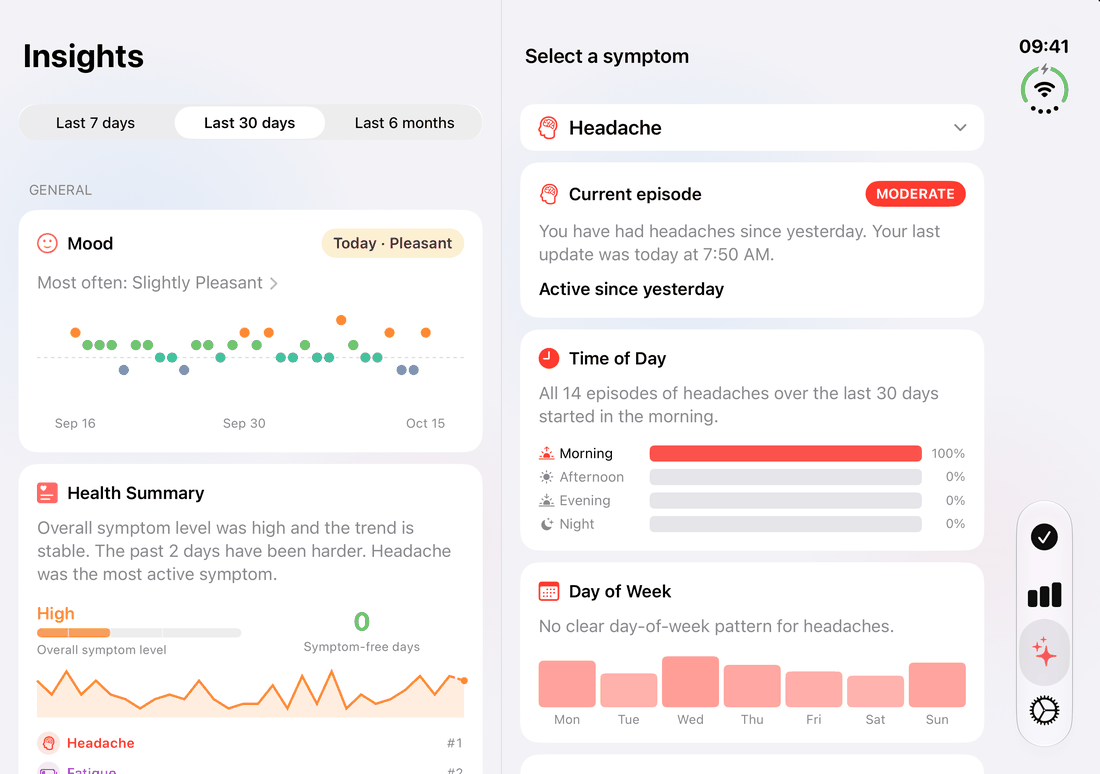
Folded, everything fits the cover screen, so you log a symptom with one hand. Open, Trace Health uses both screens: symptoms and habits side by side, insights next to your overview, and the daily symptom review beside your symptoms.



“Coffee is why you can't sleep.”
Log the ordinary stuff: coffee, late nights, workouts, meds. Trace Health lines it up against your symptoms and your mood, and tells you when the effect lands, how likely it is, and exactly which logs it's based on.
Trace Health starts telling you things.
See how it evolves
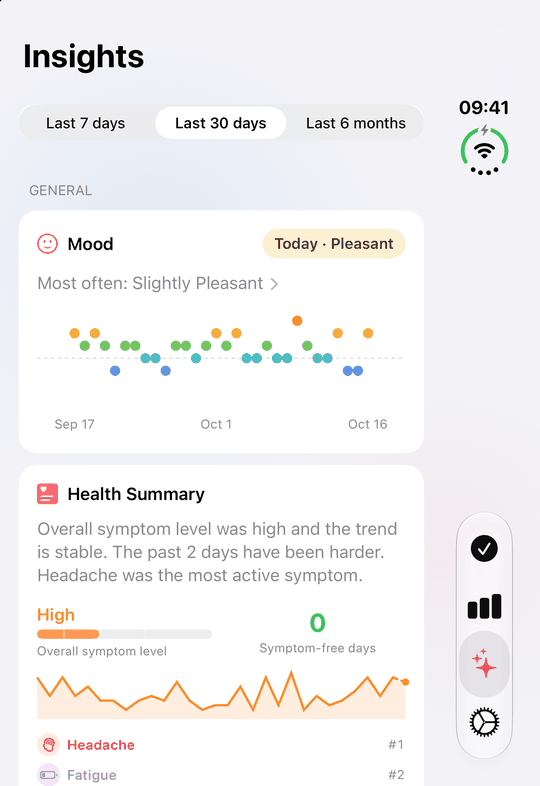
A clear view of how your health moves over weeks, months and years. The Insights tab turns your symptom tracking into trends, week-on-week comparisons and a Year in Pixels, then says in plain language whether things are actually getting better.
It connects to the rest of your life.
Syncs both ways with Apple Health
Every other tracker we know of only reads from Apple Health. Trace Health writes to it too: your symptoms become real Health entries, next to sleep and cycle. And it reads back what Health already knows, so you never log it twice. To Apple Health: Symptoms, activities and mood. From Apple Health: Workouts, sleep, mood and periods.
Track the whole family
Separate profiles for a partner, a child, an ageing parent. Switch between them in a tap; each keeps its own symptoms, history and reports, on the same phone, still with no account.
Hand your doctor a PDF
One button turns your tracking into a clean report for your doctor or specialist: severity across the dates you pick, each symptom's Year in Pixels, its episodes (how long they last, how bad they get) and the activities you logged. Made to get the most out of the time you have in the appointment.
Log your symptoms without opening the app, with Widgets
Widgets put any symptom one tap away on your Home Screen, next to today's mood and your cycle day. Live Activities keep the ones you have active on your Lock Screen, where you can see them and change severity without opening the app.
Your symptoms, your setup.
Start from 35 conditions, 100+ symptoms across 12 categories, from neurology and gut health to dermatology, women's health, mental health, sleep and heart. Keep the ones you actually live with, reorder them, hide the rest.
On Premium, add your own with your own name, colour and icon, so the app is shaped around your condition instead of an average of everyone's.
Your health data never leaves your iPhone.
No account to create. No private health data on a server, because there is no server. No ads, nothing sold. Delete the app and the data goes with it.
- No account, no email, no server
- Nothing uploaded to a server, ever
- No ads, no selling or theft of data
- Export or delete everything, anytime
- Optional backup to your own private iCloud
What people say
Rated 4.7 out of 5 from 69+ ratings on the App Store.
- Awesome and even better every release, “I’ve been using this for almost a year, I have made some suggestions which they’d have deployed even better than what I suggested. Every release gets better couldn’t be more pleased.” (Rlevs, United States)
- A perfect app for tracking symptoms, “About a month ago, I did a scan of the App Store to see if there was any new apps for symptom tracking and I found Trace Health. It had what I was looking for, but missing some minor features. I decided to give it a shot and I was really pleased with it, it worked in the way I wanted it. And the biggest plus was a super dedicated developer that keeps adding features that I was wondering about at a super fast pace. I can’t recommend Trace Health high enough!!!” (redferret2001, United States)
- Useful, “This is what I was looking for in a symptom tracking app. I like the ability to adjust severity and check in when a symptom has resolved itself.” (Missyfro, United States)
- Game changer, “I’ve only used this app for a few minutes, but I already know it’s going to be amazing. I’d been looking for a long time for something practical to monitor the symptoms of my chronic illness. The basic need is already met, and if the analysis feature works as planned on top of that, it’ll be just extraordinary.” (Maud'moiselle, France)
- Really good and simple symptom tracker, “I’m really happy with Trace. It makes it easy and quick to record symptoms, pain and how they change over time, without it becoming a hassle or hard to keep up with. The app is intuitive and clear, and I especially like being able to get a better overview of how my symptoms are developing. An app I actually end up using day to day. ⭐️⭐️⭐️⭐️⭐️” (LilandAndreas, Denmark)
- Chronic conditions must have!, “Absolutely love, love, love. Exactly what I needed to track my symptoms. LOVE it doesn’t collect data and syncs with apple health. I want to log to apple health, but it is cumbersome. This solves that and then some!” (alouusea, Iceland)
- This is a game changer, “Ok so I try so hard to track symptoms but apple health doesn’t have a widget for that and it’s kind of a pain to track down every little thing… Now this app!!!! Everything is right there, there’s widgets, it’s fast and simple and syncs! I freaking love this app! I’m still playing with it so I haven’t seen if it has a “how are you feeling right now” feature but it is everything I have ever wanted the symptoms on health to be!” (grofica82, United States)
- My health, “This has given me a great tool to discuss my health issues with my doctor” (WVa Smitty, United States)
- Super!, “Very clean and well organized, nicely customizable. Practical widgets for the home screen. Exactly what I was looking for, thanks 👍” (jxleya, Germany)
- The app I was looking for, “I highly recommend this app, no annoying ads etc, straight to the point of keeping a track of health symptoms, the best health monitor app I have ever used.” (Trisroy-Best, United Kingdom)
- Very useful and private, “The app is simple, fun, and life-changing for me. I chose it mainly so that my data is never shared, and because it’s the easiest to use. I used to write my symptoms down in a notebook; now I do it every day on the app to track how they change. Being able to also log my everyday activities to see their influence is very handy. I recommend it!” (Solex94, France)
- Exactly what I was looking for, “Out of all the symptom tracker apps, I found this to be the easiest and most straightforward. It “writes” to the health app, which is exactly what I wanted. All the others only “read” parts of the health app data, and didn’t truly write any data back. This helps me visualize my chronic symptoms soooo well.” (EB1700, United States)
- Simple and useful, “I’m not really into tracking mood and habits but this app has shown me the benefit of doing so and has helped me reflect on my day to help find the positives and see where I can improve.” (GavinLanoe, United Kingdom)
- Very useful, “This app is wonderful. You can add symptoms and rearrange them as you like. The best part: your sensitive health data is only stored on your own device.” (WhoKnowsTypo, Netherlands)
- Great app, “Finally a simple iOS 26 symptom reporting app, thank you 😀” (stranack, United Kingdom)
- Top-notch, “Finally an app in which I can collect and analyse all my symptoms. And that reminds me to log them.” (sunsoul01, Austria)
Track what triggers or relieves your symptoms.
Built for the things that don't show up on a blood test.
Questions people ask
Do I need an account?
No. You open the app and start logging. Nothing to sign up for, no password to lose.
Where is my data stored?
On your iPhone, in Apple's encrypted storage, plus your own iCloud backup if you have one enabled. It is never uploaded to a Trace Health server, because there isn't one.
How does Trace Health find my triggers?
You log everyday activities alongside symptoms. Trace Health compares the two over time, shows when the effect tends to land, hours or days after, and always tells you how many logs the conclusion is based on. Triggers are in the free tier. Relievers, the things that make a symptom better, are part of Premium.
Can my doctor use the report?
That's what it's for. The PDF shows severity over your chosen date range with a clean history list, designed to be read in the two minutes you get. Reports covering the last 30 days are free; Premium covers any date range.
Does it work with Apple Health?
Yes, both ways. Trace Health writes your symptoms into Apple Health as real Health entries, next to sleep and cycle, where most trackers only read from it. It also imports from Apple Health: workouts recorded by your Apple Watch, your iPhone or another app arrive as activities (a run as Running, a walk or hike as Walking / Hiking), and each night is logged as Poor, Normal or Great Sleep from how long you slept, naps included. Your past workouts and nights come in too, so insights don't start from zero, and anything you log yourself replaces the imported entry, so there are no duplicates. Your daily mood syncs both ways too, with State of Mind: Trace writes it to Apple Health, and daily moods logged in the Health app or another app come into Trace without duplicates. Periods and spotting come in too, from the Health app or a period app that saves to it, so your cycle insights can start with your history. Apple Health sync is part of Premium.
What does it cost?
The free tier covers what most people need: one-tap logging, 35 conditions, 100+ symptoms, charts, triggers, basic insights, Live Activities, the Lock Screen count, and PDF reports for the last 30 days. Daily mood is free as well: logging, the chart, the history, what lifts your mood and which symptoms move with it; Premium adds what weighs on your mood, the mood curves around your symptoms and the 6-month view. Cycle tracking is free too: your cycle day, next period, the Cycle Calendar and the symptoms linked to your cycle; Premium adds the detail of each pattern and what to expect. Premium is a subscription for people who want to make it their own: custom symptoms and activities, relievers, Apple Health sync, widgets that log, the Apple Watch app, family tracking and your full history. Premium costs $29.99 a year in the US. No ads.
Is there an Apple Watch app?
Yes. Trace Health on Apple Watch logs symptoms and activities with the same one tap as on iPhone, shows the last seven days of any symptom, and puts quick-log complications on your watch face. It syncs with Trace Health on your iPhone through Apple's own connection between the two, with no account and no Trace Health server involved, and everything you log joins the same history, charts and reports. The Apple Watch app is part of Premium and needs watchOS 11 or later. It also has a page for today's mood, so you can set your daily mood from your wrist.
Can I track my mood too?
Yes. Once a day Trace Health asks how you felt overall. You can change it until midnight, fill in missed days and add a private note. Insights show your mood over 7 days, 30 days or 6 months, and after a few weeks what tends to lift it and what weighs on it, including how it moves around your symptoms. Mood is on by default and can be turned off in Settings. Logging, the chart, the history, what lifts your mood and which symptoms move with it are free; what weighs on your mood, the mood curves around your symptoms and the 6-month view are part of Premium.
Can I track my period and cycle?
Yes. Add Period Flow from Women's Health, or choose a condition such as PCOS, endometriosis, PMDD or perimenopause, and log your period in one tap like any symptom; light bleeding between periods goes in Spotting. The Your cycle card in Insights shows your cycle day, your usual cycle and period length and your next period, and the Cycle Calendar shows past and expected periods and your fertile window. After a few cycles, Trace Health shows which symptoms are linked to your cycle and what to expect in the next days. Predictions are estimates, never a method of contraception. Logging, the cycle card, predictions and the calendar are free; the detail of each pattern, the symptoms to expect and Apple Health import are Premium.
What is the Daily Symptom Review?
A fast, fun way to update the symptoms you still have from earlier days, once a day when you open Trace Health. Each one comes up as a card: swipe left if it's gone, right if it's still there, and change its severity on the card if it moved. It's optional: you can always update a symptom with a tap on the homepage, and you can open the review any time from your active symptoms there. New in version 1.16.
Does Trace Health work on iPhone Duo?
Yes, Trace Health is made for iPhone Duo. Folded, everything fits the cover screen, so you can log a symptom with one hand. Open, it uses both screens: symptoms and habits side by side on the homepage, a symptom's insights next to your overview, history and insights together on each symptom page, and the daily symptom review beside your symptoms.