Which Mood Tracker Apps Sync With Apple Health State of Mind? (iOS 18+)
Since iOS 18, Apple Health has a place for your mood: State of Mind. You can log it in the Health app or on your Apple Watch, and other apps can save to it and read from it too. Trace Health is a symptom, mood and cycle tracker for iPhone and Apple Watch that syncs your daily mood with State of Mind in both directions. Below: what State of Mind is, which mood trackers sync with it (checked October 2026), and how to set it up in Trace Health, step by step.
Quick answer
We build Trace Health, so read this with that in mind: every fact about another app below comes from its own App Store listing, website or help pages, checked on 10 October 2026.
- Yes, third-party apps can sync with State of Mind. Since iOS 18, HealthKit lets any app, with your permission, save State of Mind entries to Apple Health and read them. Answers saying that only Apple's apps can write it are out of date.
- Both ways, with your symptoms and cycle: Trace Health. It saves your daily mood to State of Mind and brings in the daily moods and emotions you log in the Health app, on Apple Watch or in other apps, without duplicates. It also has an Apple Watch mood page and complication. Apple Health sync is part of Premium ($29.99 a year).
- Apps that save your mood to State of Mind: Diarly (a journal), MoodKit, MoodJot, Mood Easy and MoodFlow, and Apple's own Journal app.
- No State of Mind sync documented: Daylio, How We Feel, Finch, Moodfit and Moodnotes. Bearable says it only reads from Apple Health, and not State of Mind.
- Built in: the Health app on iPhone and the Mindfulness app on Apple Watch log your State of Mind directly.
What is State of Mind in Apple Health?
State of Mind is the mood and emotion record Apple added to the Health app with iOS 18 and watchOS 11, under Mental Wellbeing. Each entry is one of two kinds:
- A daily mood: how you have felt overall today.
- A momentary emotion: how you feel right now.
Each entry sits on a seven-step scale from Very Unpleasant to Very Pleasant, and can carry words that describe it (such as Calm, Anxious or Stressed) and what it relates to (such as work, family or health). On iPhone you log it in the Health app (Browse, Mental Wellbeing, State of Mind); on Apple Watch, in the Mindfulness app, where the Digital Crown sets how you feel. The Health app then shows it next to your sleep, exercise and other data.
Can third-party apps write to State of Mind?
Yes. Since iOS 18 and watchOS 11, HealthKit, the framework apps use to work with Apple Health, has a State of Mind data type. With your permission, an app can save State of Mind entries and read them: daily moods and momentary emotions, with their level, the words that describe them and what they relate to. Apple presented it at WWDC 2024 in “Explore wellbeing APIs in HealthKit”.
Some AI answers and older forum threads still say there is no public API and that only Apple's apps can write State of Mind. That is not the case on iOS 18 or later: the apps below save to it, and in the Health app each entry shows the app it came from. What is true is that each app has to build the sync, and you have to allow it on Apple's permission screen.
Which mood trackers sync with State of Mind? (checked October 2026)
| App | Saves your mood to State of Mind | Brings State of Mind in | Apple Watch | Good to know |
|---|---|---|---|---|
| Trace Health | Yes: your daily mood, plus Anxiety and Stress logs as emotions | Yes: daily moods and emotions from the Health app, Apple Watch and other apps | Yes: a Mood page and a complication | Symptom, mood and cycle tracker; no account; sync is part of Premium ($29.99 a year) |
| Diarly | Yes, from iOS 18 | Not stated | Has a watch app; mood logging on it not stated | A journal app with moods |
| MoodKit | Yes: check-ins saved as State of Mind (iOS 18) | Not stated | No | Logging is free; Premium adds insights |
| MoodJot | Yes: moods saved as State of Mind | Not stated | No | Free with ads; Premium removes them |
| Mood Easy | Yes, iOS 18 or later | Not stated | Yes, with complications | Free |
| MoodFlow | Yes, optional | No | Yes | Writing to Apple Health is not a Premium item |
| Apple Journal | Yes: log your state of mind from Journal | - | - | Apple's free journaling app |
| Daylio | Not documented | Not documented (its privacy policy mentions importing from Apple Health) | No | Popular mood diary; no account |
| How We Feel | Not documented | Not documented (reads sleep and exercise) | No | Free emotion journal |
| Bearable | No: “Bearable only reads data from other health apps” | No (reads steps, sleep, heart rate) | No | Symptom and mood tracker; account required |
“Not documented” means we found no mention on the app's own site, help pages or App Store listing on 10 October 2026; an app can add the sync at any time. The State of Mind entries already in your Health app show which apps on your iPhone write to it.
How Trace Health syncs your mood with State of Mind
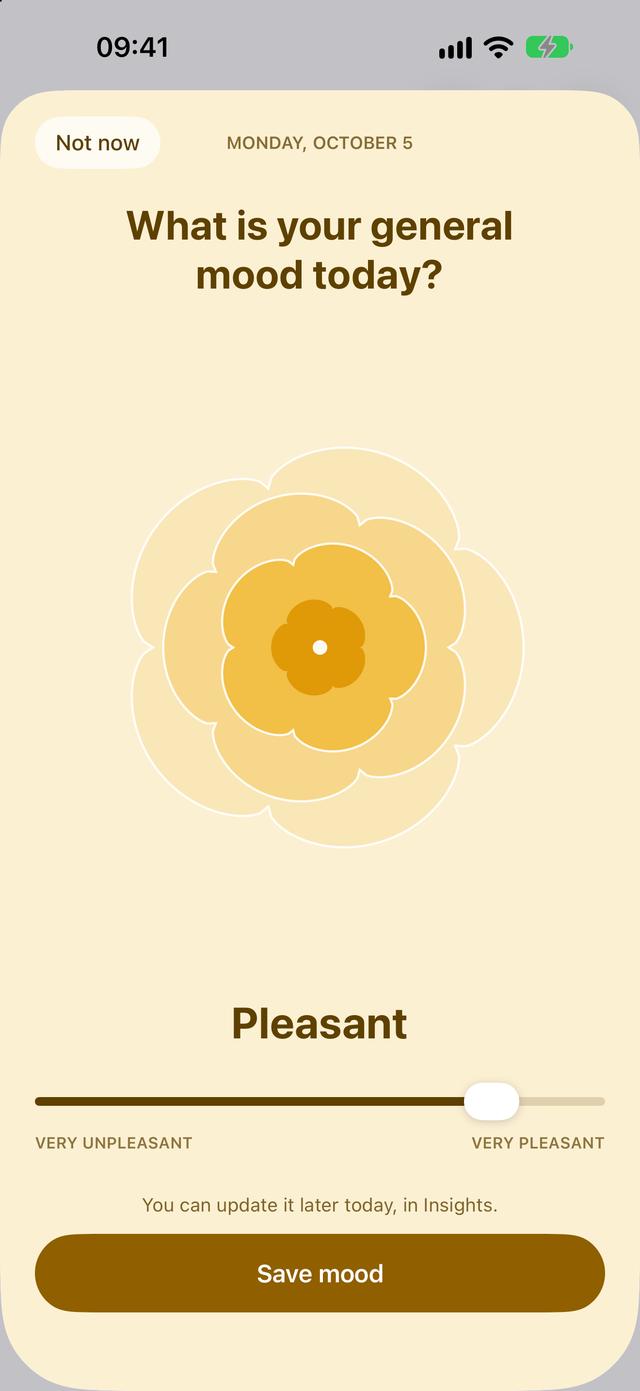
Trace Health asks once a day how you felt overall, and you answer in one tap on the same seven levels Apple uses, from Very Unpleasant to Very Pleasant. That daily mood is exactly what State of Mind calls a daily mood, so the two line up without any conversion.
- Export saves your daily mood to State of Mind, one entry per day, as how you felt overall. Change your mood and the entry in Apple Health is replaced; delete it in Trace and it is deleted in Apple Health. Your notes stay in Trace and are never exported. Moods set from the widget or the Apple Watch are saved too.
- Anxiety and Stress go to State of Mind too. When you log the Anxiety symptom or the Stress activity, Export also saves a momentary emotion, described as Anxious or Stressed, so they appear next to your mood in Apple Health.
- Import brings into Trace the daily moods and momentary emotions logged in the Health app, on your Apple Watch or in another app, with your past ones. The words you chose in Health (such as Calm, Grateful or Anxious) are kept as a note. They join your mood chart and history, marked as coming from Apple Health, and count in your mood insights. When a day has a daily mood, that is the day's mood; an emotion sets it only on a day without one. Nothing is duplicated: Trace never reads its own entries back, and a mood deleted in Apple Health is deleted in Trace too.
Apple Health sync is part of Premium. It works for the main profile, on iOS 18 or later.
Set it up in Trace Health, step by step
- Install Trace Health on your iPhone (iOS 18 or later). Your daily mood is on by default; you can check it in Settings, Mood, Daily mood.
- In Settings, under Apple Health, turn on Sync with Apple Health. Trace first shows, step by step, what Apple's permission screen will ask, then tap Open Apple Health.
- On Apple's screen, turn on all categories (Turn On All, or Select All Topics on iOS 27) so State of Mind is allowed both ways, then tap Allow. On iOS 27, choose how far back Trace may read: Trace imports up to one year.
- Export to Apple Health is now on: from your next mood, it is saved to State of Mind.
- To bring in the moods you log in the Health app, on your Apple Watch or in another app, turn on Import from Apple Health below it. How it works explains what comes in.
- Open the Health app, then Browse, Mental Wellbeing, State of Mind: your daily moods from Trace are there, next to the ones you logged elsewhere.
If you turned State of Mind off on Apple's screen, Trace lists Mood in its “not syncing with Apple Health” warning in Settings. Apple only asks once, so the switch is now in the Health app (Sharing, Apps, Trace), and Trace shows you the way.
Your mood on Apple Watch
There are two ways to log your mood from the wrist, and with Trace both end up in the same place:
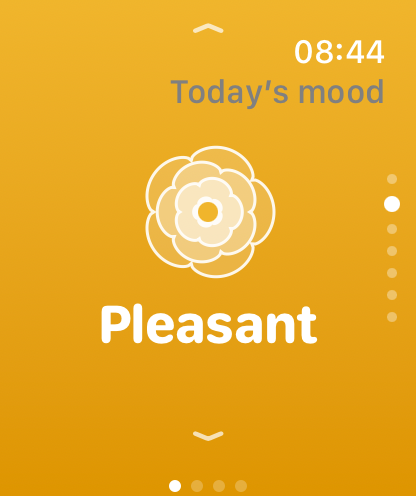
- The Trace Health watch app. Its Mood page is one swipe away: swipe up or down, or turn the Digital Crown, to step through the seven levels, and today's mood is saved. A long press shows your last seven days, and a watch face complication (also in the Smart Stack) shows today's mood in its colour. The mood joins your history on your iPhone and, with Export on, State of Mind. Part of Premium, watchOS 11 or later. See the Apple Watch app.
- Apple's Mindfulness app. Log a State of Mind there, how you feel right now or over the whole day, and with Import on it comes into Trace: a daily mood as that day's mood, an emotion on a day without one.
Why sync your mood with Apple Health
- One record, whichever app you used. Log in Trace, on the watch or in the Health app, and your mood history stays complete in both.
- Your mood next to the rest of your health. Apple Health shows State of Mind alongside sleep, exercise and your cycle, and Trace adds your symptoms and daily activities to the picture.
- Your data stays yours. What is saved to Apple Health stays there if you ever stop using Trace, and Trace has no account and no server: your moods stay on your iPhone.
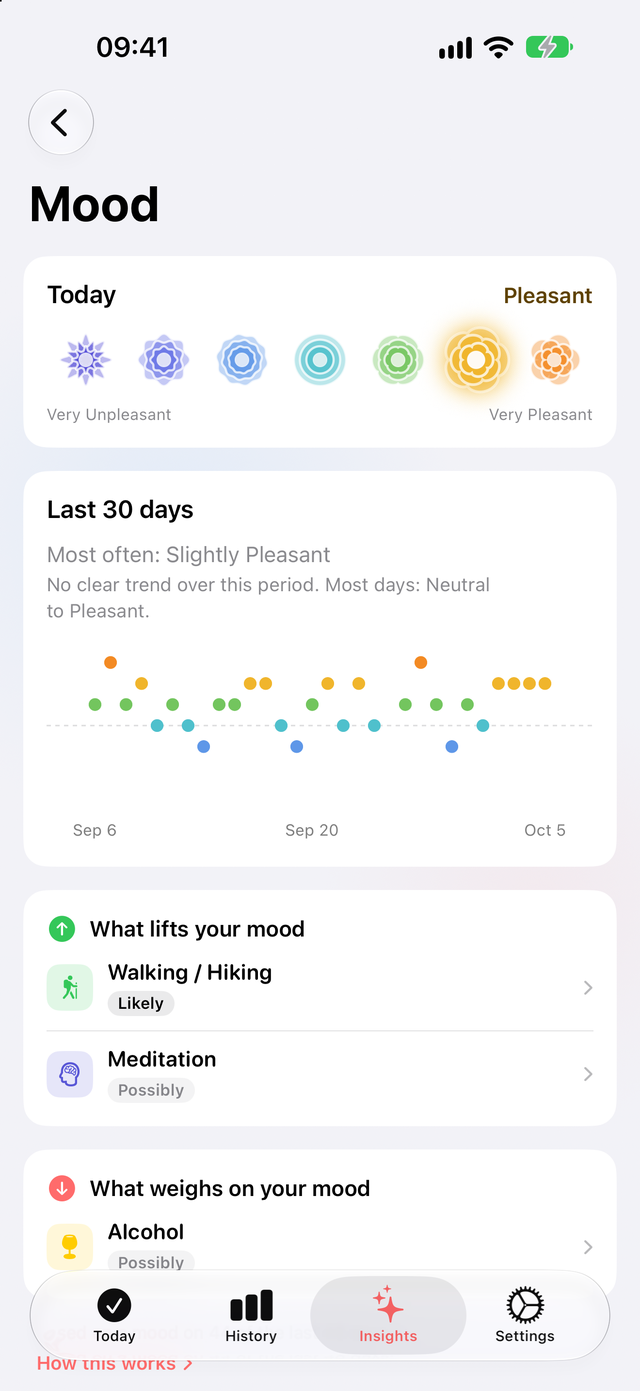
- Patterns from your own days. In Trace, after about three weeks of moods, Insights shows what tends to lift your mood and what weighs on it, and how it moves with your symptoms. See the mood tracker.
Limits, to be clear
- State of Mind needs iOS 18 or later, and Trace's watch app needs watchOS 11 or later.
- In Trace you log one overall mood per day. It does not log moment-to-moment emotions of its own, apart from the Anxiety and Stress logs described above; the emotions you log in the Health app or on Apple Watch come in with Import.
- Apple Health sync is part of Premium and covers the main profile only.
- Trace runs on iPhone, with a companion Apple Watch app. There is no Android version.
- It is a tracking tool, not a medical device or a crisis service. If you are thinking about harming yourself, call your local emergency number or a crisis line now.
Frequently asked questions
Which mood tracker apps sync with Apple Health State of Mind?
Trace Health syncs both ways: it saves your daily mood to State of Mind and imports the daily moods and emotions logged in the Health app, on Apple Watch or in other apps. Diarly, MoodKit, MoodJot, Mood Easy, MoodFlow and Apple's Journal app save moods to State of Mind. Daylio, How We Feel, Finch and Moodfit don't document it, and Bearable only reads other Health data (checked October 2026).
Can third-party apps write to Apple Health State of Mind?
Yes, since iOS 18. HealthKit has a State of Mind data type that any app can save to and read from, with your permission, for daily moods and momentary emotions alike. Apple presented it at WWDC 2024. Each app still has to build the sync, so check its settings or listing.
Does Daylio or How We Feel sync with State of Mind?
Neither documents it on its own site or App Store listing (checked October 2026). Daylio's privacy policy mentions importing data from Apple Health, and How We Feel reads sleep and exercise. If you want your mood in State of Mind, use an app that states it, such as Trace Health, Diarly or MoodKit.
Does Trace Health sync my mood with Apple Health State of Mind?
Yes, both ways. With Export on, Trace saves your daily mood to State of Mind as how you felt overall that day (notes are not exported), and your Anxiety and Stress logs as momentary emotions. With Import on, daily moods and momentary emotions logged in the Health app, on Apple Watch or in other apps come into Trace, past ones included, without duplicates, with the words you chose in Health as a note; a daily mood beats an emotion for the day's mood. Apple Health sync is part of Premium.
How do I turn on State of Mind sync in Trace Health?
In Trace Health, open Settings and, under Apple Health, turn on Sync with Apple Health, then allow all categories on Apple's screen. Export to Apple Health turns on, and your next mood is saved to State of Mind. Turn on Import from Apple Health to bring in moods logged elsewhere.
Where do I see my State of Mind in the Health app?
In the Health app, tap Browse, then Mental Wellbeing, then State of Mind. Moods saved by Trace Health appear there with Trace as their source, next to the ones you logged in the Health app or on Apple Watch.
Can I log my State of Mind on Apple Watch?
Yes, two ways. Apple's Mindfulness app logs a State of Mind directly. The Trace Health watch app has a Mood page (swipe or turn the Digital Crown through seven levels) and a watch face complication; the mood goes to your iPhone and, with Export on, to State of Mind. The Trace watch app is part of Premium and needs watchOS 11 or later.
Will my moods be duplicated if I log them in both apps?
No. Each day keeps one mood in Trace: an imported mood and your own for the same day are not added twice, Trace never reads back what it saved itself, and a mood deleted in Apple Health is deleted in Trace too.
Is State of Mind sync free?
Logging your daily mood in Trace Health, the chart, the history and what lifts your mood are free. Syncing with Apple Health, both ways, is part of Premium, along with the Apple Watch app.
Keep your mood in one place. Install Trace Health on your iPhone, log your mood in one tap a day, and keep it in step with Apple Health State of Mind.