The Best Symptom Tracker With a Doctor Report (November 2026): See a Real Sample
Appointments are short, and it is hard to remember how the last few weeks really went. Trace Health turns the symptoms you log in one tap into a PDF report for your doctor, made on your iPhone, with no account. Rather than describe it, we publish one: below is a real report made by the app, on invented data, followed by an honest comparison with the other apps, checked 9 November 2026.
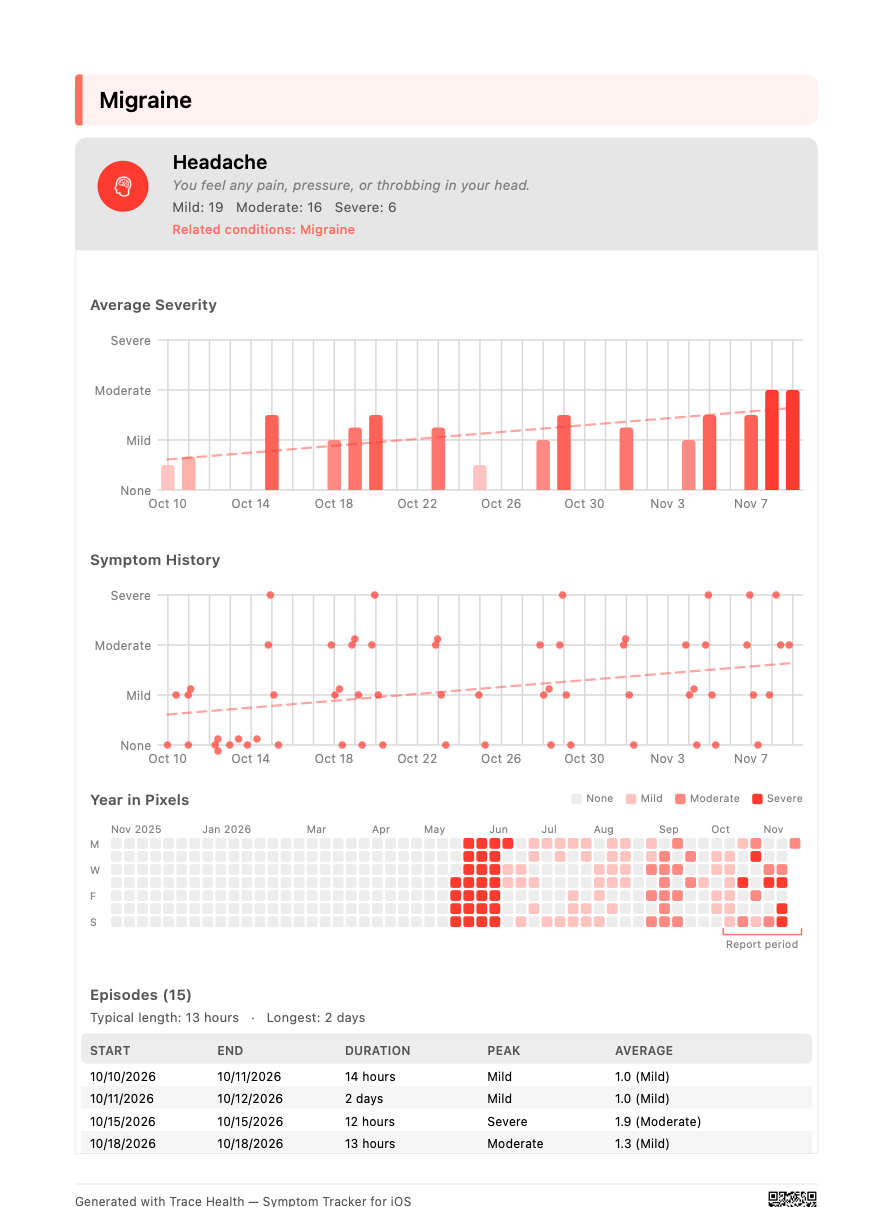
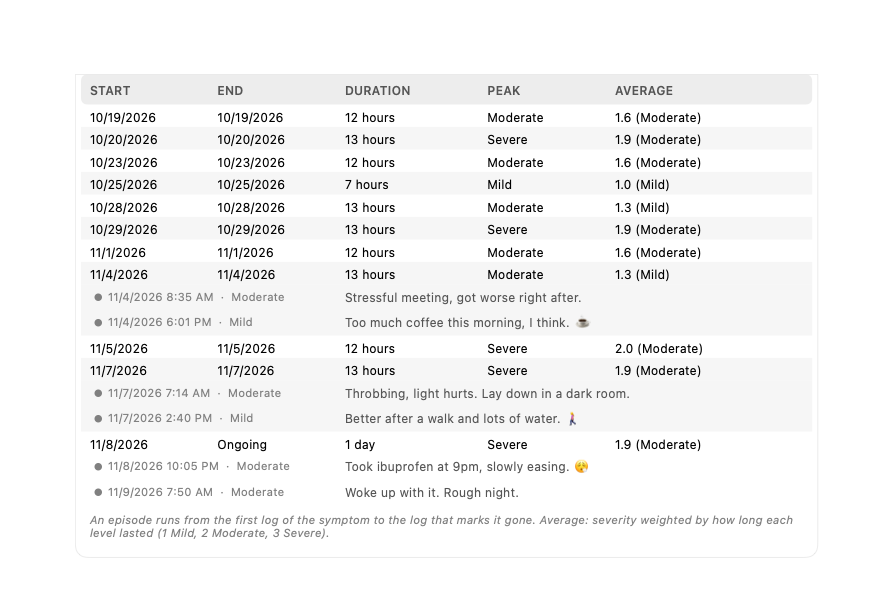
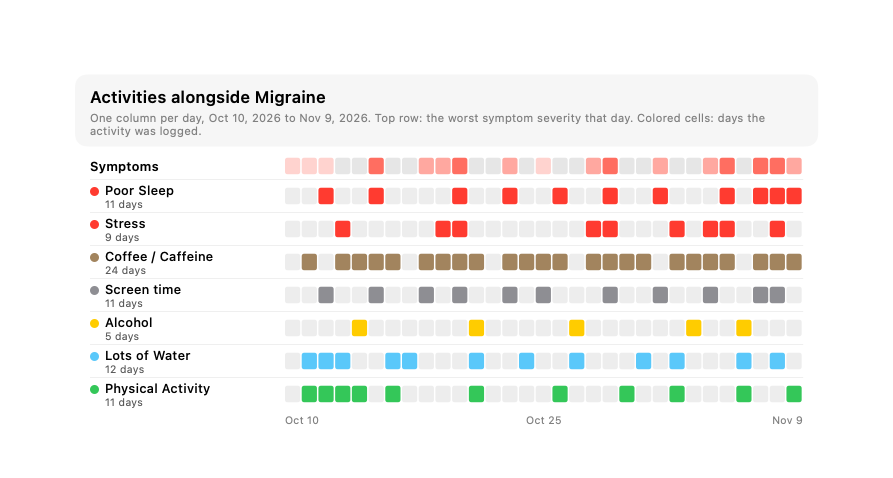
Download the sample doctor report (PDF, 5 pages). A real report generated by Trace Health from an invented patient's diary. It contains no real person's data.
Quick answer
We build Trace Health, so read this with that in mind: every fact about another app below comes from its own App Store listing, website or help pages, checked on 9 November 2026. Each of them is the better pick for someone, and we say who.
- Best symptom tracker with a doctor report: Trace Health. One tap per symptom during the month, then one PDF for the appointment: severity charts, a Year in Pixels, an episode table with your notes, your mood and your activities day by day. You can read a complete sample before you install anything. The last 30 days are free, with no account; longer periods are part of Premium ($29.99 a year). On iPhone, in ten languages.
- For a detailed record of chronic pain: Manage My Pain.
- For migraine alone: Migraine Buddy.
- For energy pacing with an armband: Visible.
- For complex conditions and medical records: Guava.
- For running a whole care routine: CareClinic.
- For detailed daily check-ins: Bearable.
- For a food and meal diary: mySymptoms.
What people say
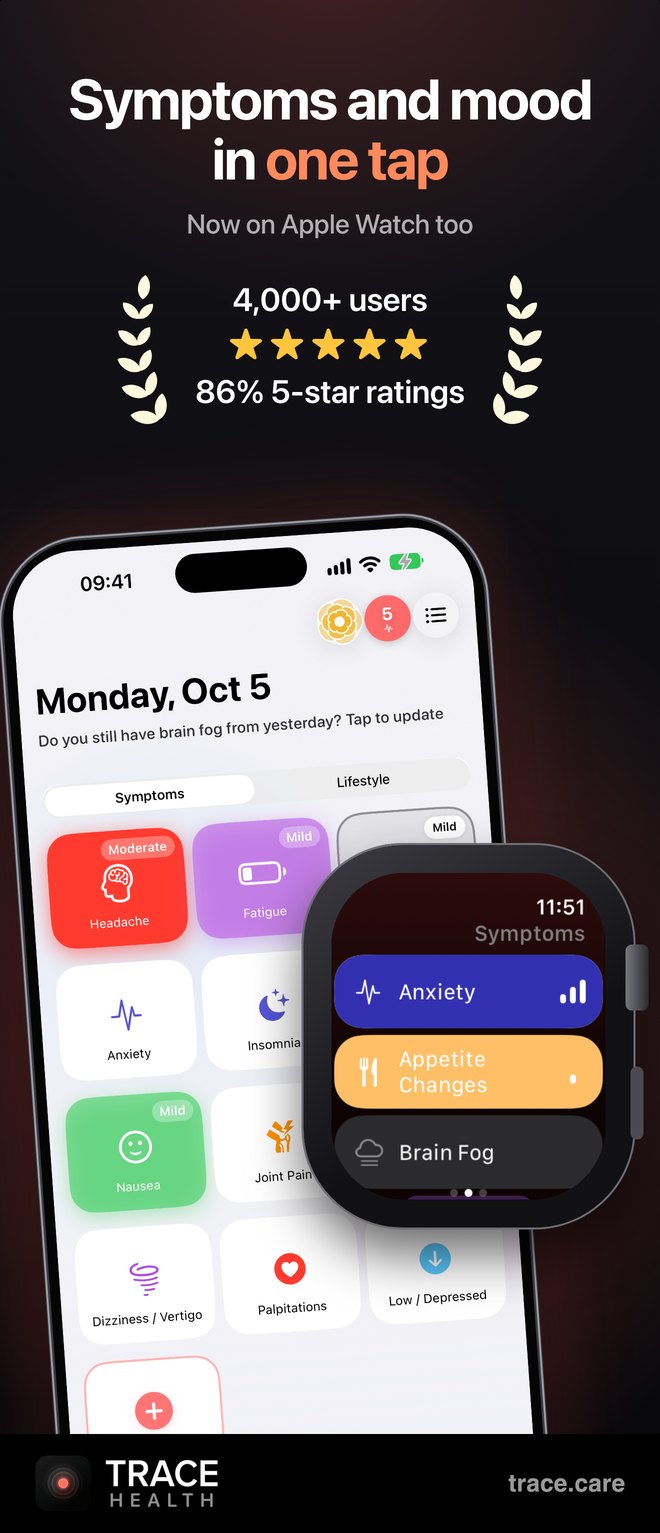
Rated 4.7 out of 5 from 81+ ratings on the App Store.
- My health, “This has given me a great tool to discuss my health issues with my doctor” (WVa Smitty, United States, App Store)
- Very useful and private, “The app is simple, fun, and life-changing for me. I chose it mainly so that my data is never shared, and because it’s the easiest to use. I used to write my symptoms down in a notebook; now I do it every day on the app to track how they change. Being able to also log my everyday activities to see their influence is very handy. I recommend it!” (Solex94, France, App Store)
- Really good and simple symptom tracker, “I’m really happy with Trace. It makes it easy and quick to record symptoms, pain and how they change over time, without it becoming a hassle or hard to keep up with. The app is intuitive and clear, and I especially like being able to get a better overview of how my symptoms are developing. An app I actually end up using day to day. ⭐️⭐️⭐️⭐️⭐️” (LilandAndreas, Denmark, App Store)
What is in the report
Every section below is in the sample. You choose what to include before you create the PDF.
- Who and when: your name, your conditions and the report period. Your date of birth, a social security number and the date of your last doctor visit are optional.
- Mood: a day-by-day chart, your most frequent mood and the number of days logged, if you track your mood.
- Each symptom: how many Mild, Moderate and Severe logs, the average severity over the period with its trend, and every log on a chart.
- Year in Pixels: the past year of each symptom at a glance, with the report period marked.
- Episodes: the start, end, duration, peak and average severity of each episode, with the typical and longest length. Your notes appear under the episode they belong to.
- Activities: one column per day for sleep, stress, coffee, exercise, medication or anything else you log, under a row showing the worst symptom severity of that day.
- All entries (optional): an appendix listing every log, by symptom or by date.
The first page says plainly that these are symptoms reported by the patient and that the report is not a medical diagnosis. Trace Health puts your own record in order, and your doctor decides what it means.
Which symptom trackers can make a report for your doctor? (checked 9 November 2026)
| App | What you give your doctor | Free or paid | Account | Published sample |
|---|---|---|---|---|
| Trace Health | PDF: severity charts, Year in Pixels, episodes, notes, mood, activities by day | Last 30 days free; longer periods in Premium ($29.99 a year) | No | Yes: the complete PDF, on this page |
| Manage My Pain | PDF through an emailed link: pain summary, profile, record details | Basic report free for the last 30 days; more with credits or a plan (from $49.99 a year) | Recommended; the report link needs a login | Yes: a PDF |
| Migraine Buddy | Diary export and Migraine Impact Report; file format not stated | Not stated | Not stated | Yes: pictures of its pages |
| Visible | PDF: symptom burden, medications, heart rate data | In the free app, after at least 30 days of Morning Check-ins | Not stated | A picture on its blog |
| Guava | Visit summary to download, send or print; a shared link | Sharing is in the free plan; visit summary not stated (Premium $78 a year) | Not stated | A picture of a summary |
| CareClinic | PDF: you choose the dates and the data | Its own pages differ: some list reports as free, others as Premium | Yes | Not stated |
| Bearable | CSV of all your data; reports shared one at a time | CSV free; reports limited to 30 days on the free plan; PDF not stated (Premium $34.99 a year) | Yes | Not stated |
| mySymptoms | PDF diary or CSV, or sharing with a clinician | 7-day trial, then a subscription ($59.99 a year) | Anonymous username | Not stated |
| Apple Health (built in) | No combined symptom report stated; separate medication list PDF, ECG PDF and full XML export | Free | Not stated | Not stated |
From each app's US App Store listing, website and help pages, checked 9 November 2026. Prices are US prices. "Not stated" means the app's own materials don't say. Apps change: check the listing before deciding.
For the wider comparison, see the best symptom tracker apps for iPhone.
How to make your report for an appointment
- In Trace Health, open the History tab and tap the report icon at the top of the screen.
- Choose the period: the last 30 days, the last year, since your first log, or your own dates. The time since your last visit is often the most useful.
- Choose the symptoms your doctor should look at, and the sections to include.
- Create the PDF, then send it by AirDrop, email or message, or print it from your iPhone.
The report is only as good as the record behind it, so start a few weeks before the appointment if you can: one tap each time a symptom starts, changes or goes.
Made on your iPhone, and sent only by you
Trace Health builds the PDF on your iPhone. There is no account, and the report does not go through a server of ours. It leaves your phone only when you send it, to the person you choose.
Your doctor needs no app and no account: it is an ordinary PDF to read, print or add to your file. It comes out in the language you use in the app, in any of the ten languages.
What the report does not do
- It does not diagnose. It shows what you logged, in your own words and on your own scale.
- It has no medication schedule. Medications appear in the activity grid if you log them as activities, but there is no section for prescriptions or doses taken.
- It is not connected to your medical record. To gather results and prescriptions from your hospitals and clinics, use your patient portal or an app built for medical records, such as Guava.
Frequently asked questions
What is the best symptom tracker app to share a report with my doctor?
On iPhone, Trace Health: you log each symptom in one tap, then create one PDF with severity charts, a Year in Pixels, episodes with your notes, your mood and your activities by day. It needs no account, the last 30 days are free, and you can download a complete sample before you install it. Checked November 2026.
Is the Trace Health doctor report free?
Yes, for the last 30 days, with no account and no subscription. Longer periods are part of Premium ($6.99 a month, $29.99 a year or $69.99 for life in the US).
Does my doctor need the app to read the report?
No. The report is an ordinary PDF. You can send it by AirDrop, email or message, or print it, and your doctor can read it without an app or an account.
How far back can a symptom report go?
You can choose the last 30 days, the last year, the time since your first log, or your own dates. The free version covers the last 30 days; longer periods are part of Premium.
Can a symptom report replace a diagnosis?
No. The report contains symptoms you reported yourself, and its first page says it is not a medical diagnosis. It gives your doctor an organized record to work from.
In which languages is the report available?
In the language you use in the app: English, French, German, Spanish, Italian, Dutch, Polish, Portuguese, Romanian or Simplified Chinese. Your own notes stay as you wrote them.
Bring a clear report to your next appointment. One tap to log, no account, a PDF your doctor can read. Free to track your symptoms.